- Documentation
- Overview
- Agency employee
- Confirm a report
Confirm a customer report
Check on the car each area a customer reported: confirm, adjust or reject, with your own photos, from the To confirm list or during the return inspection.
When a customer reports an accident or damage during their rental, the agency has to check what they declared. On the car, you go through each reported area, confirm, adjust or reject it, and add your own photos. Your decision creates the damages on the car's record and, for a confirmed accident, the follow-up case. Nothing is charged automatically.
Where to find the reports to confirm
- On your My tasks screen, the To confirm block lists the open reports. Tap See all for the full list.
- During a car's return inspection, a box shows "Customer report to confirm": the customer reported these areas during the rental, check them then.
- Reports on your own tasks and those handed to you come first, then accidents before simple damage.
Steps
- Open To confirm from My tasks, or tap Check and confirm from the return inspection.
- Read the customer's statement: date and time, place, what happened, and for an accident, injuries, police and other parties.
- For each reported area, look at the car, then choose Confirm, Adjust or Reject.
- If you adjust, choose the severity you observe. If you reject, explain why in the note.
- Add your photos of the area, then your general photos of the car.
- For an accident, leave I confirm the accident on if the accident is real, or switch it off.
- Read the sentence "The report will become …", then tap Send my decision.
The To confirm list
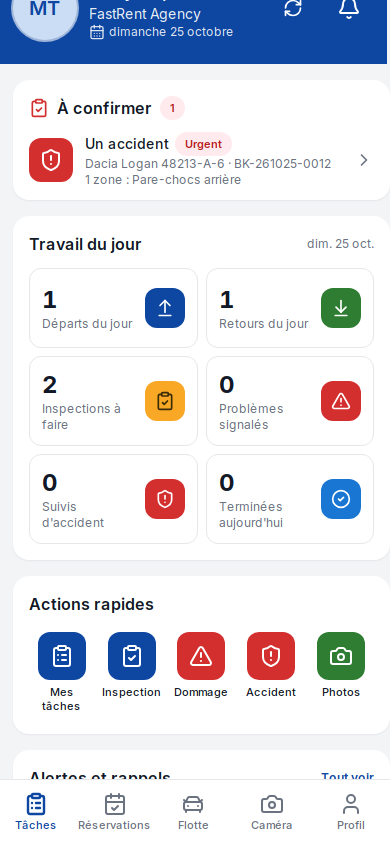
To confirm block on the home screen
| Field | Required | Values or format | Example | What it means |
|---|---|---|---|---|
| To confirm | No (read only) | One report per row | Some damage · INC-2026-00012 | Your agency's open reports. |
| Areas | No (read only) | Number and names of the areas | "2 areas: Rear bumper, Left side" | What the customer marked on the diagram. |
| Urgent | No (read only) | Badge | Urgent | An accident or a report with injuries. |
| See all | No | Button | See all | Opens the full list. |
After the action: tapping a row opens the Confirm the report screen.
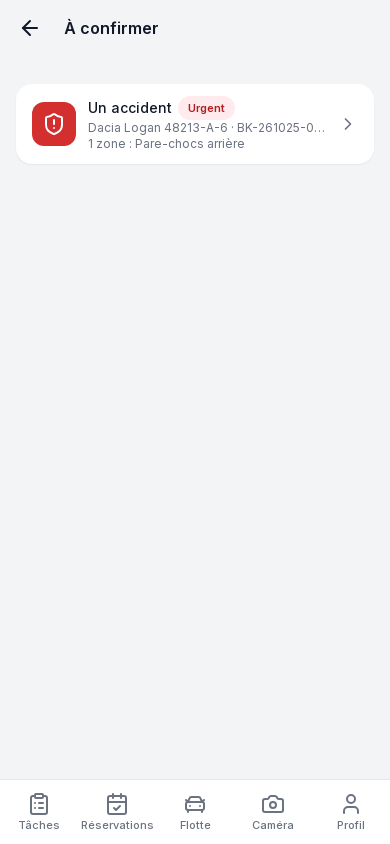
To confirm screen
| Field | Required | Values or format | Example | What it means |
|---|---|---|---|---|
| Report row | No | Type, reference, car, booking, areas, status | An accident · INC-2026-00014 · Dacia Logan · BK-240520-7821 | Tap the row to check it. |
| Status | No (read only) | Awaiting confirmation or Under review | Awaiting confirmation | Under review: some areas have already been decided. |
| Empty list | No | Message | "Nothing to confirm" | Back to my tasks button. |
After the action: the confirmation screen opens.
Check area by area
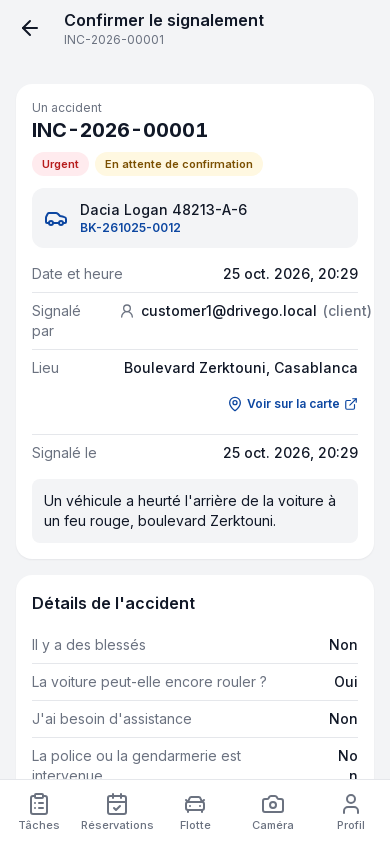
Confirm the report screen
| Field | Required | Values or format | Example | What it means |
|---|---|---|---|---|
| Date and time, Reported by, Place, Reported on | No (read only) | Text, See on the map link | Reported by: Youssef El Amrani (customer) | The statement of the customer or company driver. |
| Accident details | No (read only) | Injuries, car can be driven, assistance, police, other parties | Police: Yes · PV 1234/2026 | Only for an accident. |
| Reported areas | No (read only) | Diagram and, per area, Reported by the customer: type, estimated severity, details, photos | Rear bumper: Scratch, Low | What the customer saw. |
| Customer photos and videos | No (read only) | Photos | Photo 1, Photo 2 | The customer's general photos. |
| Decision for the area (Your check) | Yes, for each area | Confirm, Adjust or Reject | Adjust | Confirm: the damage is there as described. Adjust: it is there but the severity differs. Reject: you cannot find it. |
| Observed severity | Yes if you adjust | Low, Medium, High, Major | Medium | The severity you observe. |
| Note | Yes if you reject | Text, 1,000 characters at most | "No scratch visible on the rear bumper." | Explain each rejection in a few words; recommended when you adjust. |
| Your photos of the area | No | Photos | 1 photo of the bumper | Your evidence for this area. |
| Your photos and conclusion | Yes, at least one photo if you confirm or adjust | Photos, 20 at most, and 2 videos at most | Overall view of the car | Not required if you reject every area. |
| I confirm the accident | For an accident | Switch, on by default | On | On: "An accident case will be opened (stage 1), with the customer's statement on stage 2." |
| General note | No | Text | "Impact confirmed, rear light cracked." | Your conclusion. |
| Send my decision | Yes | Button | Send my decision | Greyed out while an area has no decision, with the reason, for example "To send: Explain each rejection in a few words." |
After you save: the Decision saved screen says: "The confirmed areas are now damages on the car's record and the customer has been notified. Nothing is charged automatically." Before sending, a sentence announces the final status, for example "The report will become "Partly confirmed"."
| Your decisions | Report status |
|---|---|
| Every area confirmed or adjusted | Confirmed |
| Some areas confirmed, others rejected | Partly confirmed |
| Every area rejected | Rejected |
| Some areas still without a decision | Under review |
During the return inspection
Return inspection box
| Field | Required | Values or format | Example | What it means |
|---|---|---|---|---|
| Customer report to confirm | No (read only) | Number of open reports on this booking | "2 customer reports to confirm" | The customer reported these areas during the rental. |
| Areas | No (read only) | List of areas | Rear bumper, Left side | To look at during your inspection. |
| Check and confirm | No | Button | Check and confirm | Opens the confirmation; Back to the inspection then takes you back to your inspection. |
After the action: you resume the return inspection where you left it.
Without network
You can decide without network. Your decision and your photos stay on the phone ("Draft saved on this phone") and the screen shows "Saved, sent when the network is back". They leave on their own as soon as the connection returns. See Working offline.
What happens next
- The customer is notified of the outcome and the status changes on their booking.
- Each confirmed or adjusted area becomes a damage on the car's record, with the customer's photos and yours. The manager then handles it like any damage.
- A confirmed accident opens a follow-up case at stage 1, with the customer's statement on stage 2.
- Nothing is charged at this point: any charge to the customer is decided later by the agency.
Troubleshooting
| Situation | Cause | What to do |
|---|---|---|
| "To send: Decide for each area: confirm, adjust or reject." | An area has no decision. | Choose a decision for each area. |
| "To send: Add at least one photo of your own." | You confirm or adjust an area without a photo of your own. | Add a photo in Your photos and conclusion. |
| "Decision refused" | Someone else has already decided this report, or some information was refused. | The reason is shown. Go back to the list: the report no longer appears if it is already handled. |
| "Nothing to confirm" | No open report in your agency. | Nothing to do. |
Updated on 25 October 2026Markdown version